Deploy your first frontend build
Deploy a static site, such as a React or Vue production build, as a frontend worker. You need:
- An organization owner or admin account, or another cloud user with access to the site. Other signed-in users can view workers but can't change them.
- A zip of your build output with
index.htmlat its root, under the 10 MiB archive limit, and no.envfiles.
The REST examples use TARUVI_SITE_URL and TARUVI_API_KEY from your app's
Settings → Connect page.
Deploy from TaruviBase Console#
-
In TaruviBase Console, open your site, select the Frontend tab, then select Deploy Frontend Worker.
-
Fill in the form:
Field What to enter Worker Name A display name, for example Quickstart UI.Custom Subdomain (Optional) The subdomain for the worker's address. Leave it blank to derive one from the name. Associated App (Optional) The app this site belongs to. ZIP file Your build archive. The Console accepts .ziponly.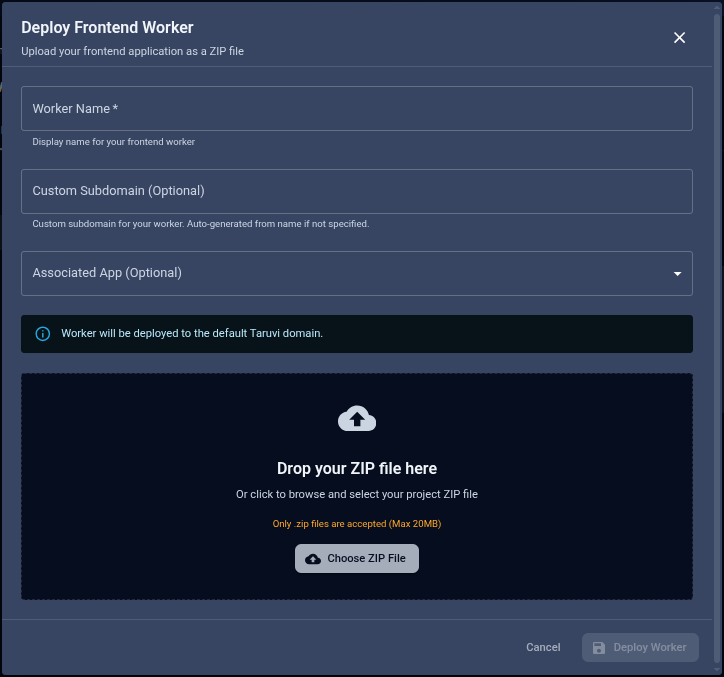
TaruviBase Console — Deploy Frontend Worker -
Select Deploy Worker.
The banner Worker will be deployed to the default TaruviBase domain means the
worker gets an address on TaruviBase's own domain. On development and staging sites
the subdomain gets an environment prefix, such as dev-. Open the worker in the
Console to see its address and open your site.
Deploy with the REST API#
The same deploy is one multipart POST; the zip is sent as form data, not
JSON.
| Console field | Form field |
|---|---|
| Worker Name | name |
| Custom Subdomain | subdomain_input (optional) |
| Associated App | app (app slug, optional) |
| ZIP file | file (.zip, .tar, .tar.gz, or .tgz) |
/api/cloud/frontend_workers/Headers
AuthorizationApi-Key $TARUVI_API_KEY
Multipart form
nameQuickstart UIsubdomain_inputquickstart-uifileFile: quickstart.zip
View cURL
curl --silent --show-error -X POST "$TARUVI_SITE_URL/api/cloud/frontend_workers/" \
-H "Authorization: Api-Key $TARUVI_API_KEY" \
--form-string 'name=Quickstart UI' \
--form-string 'subdomain_input=quickstart-ui' \
201
The request returns 201 Created. The response includes:
slug— the worker's identifier in later requests. It can't be changed.web_url— the address where the live build is served.
The first build of a worker goes live automatically. Save the slug as
WORKER_SLUG.
Upload a new version#
Upload a new build with a multipart PATCH to the worker, with
set_active=true to record it as the live build.
An upload replaces the files served at the worker's address even without
set_active; the flag only changes which build is recorded as live. To try a
build before it's public, upload it to a separate worker.
/api/cloud/frontend_workers/WORKER_SLUG/Headers
AuthorizationApi-Key $TARUVI_API_KEY
Multipart form
fileFile: quickstart-v2.zipset_activetrue
View cURL
curl --silent --show-error -X PATCH "$TARUVI_SITE_URL/api/cloud/frontend_workers/WORKER_SLUG/" \
-H "Authorization: Api-Key $TARUVI_API_KEY" \
--form-string 'set_active=true'
200
Choose which build is live#
List the worker's builds to find the uuid of the build you want:
/api/cloud/frontend_workers/WORKER_SLUG/builds/Headers
AuthorizationApi-Key $TARUVI_API_KEY
View cURL
curl --silent --show-error "$TARUVI_SITE_URL/api/cloud/frontend_workers/WORKER_SLUG/builds/" \
  -H "Authorization: Api-Key $TARUVI_API_KEY"
200
Then make it live. The build must have finished uploading (status is
completed):
/api/cloud/frontend_workers/WORKER_SLUG/set-active-build/Headers
AuthorizationApi-Key $TARUVI_API_KEYContent-Typeapplication/json
Request body
{
  "build_uuid": "BUILD_UUID"
}
View cURL
curl --silent --show-error -X PATCH "$TARUVI_SITE_URL/api/cloud/frontend_workers/WORKER_SLUG/set-active-build/" \
  -H "Authorization: Api-Key $TARUVI_API_KEY" \
  -H "Content-Type: application/json" \
  --data-binary @- <<'JSON'
{
  "build_uuid": "BUILD_UUID"
}
JSON
200
Use this to roll back: point the worker at an earlier build. Roll back only to
builds uploaded as .zip. Making a build uploaded as .tar, .tar.gz, or
.tgz live again removes the current files first and then fails, which leaves
the address empty.
Manage workers#
| Task | Request |
|---|---|
| List workers | GET …/frontend_workers/ |
| Read one worker | GET …/frontend_workers/WORKER_SLUG/ |
| Rename a worker | PATCH …/frontend_workers/WORKER_SLUG/ with name |
| Delete a worker | DELETE …/frontend_workers/WORKER_SLUG/ |
| Delete a build | DELETE …/frontend_workers/WORKER_SLUG/builds/BUILD_UUID/ |
Every path starts with ${TARUVI_SITE_URL}/api/cloud/. See the
REST API reference for the full
list.