Store your first file with TaruviBase Storage
Create a test bucket, upload a file, download it, and clean up. Choose an interface at each step.
Before you start#
You need:
- A TaruviBase app. Create one if needed.
- An API key from an organization owner or admin. In the Console, open your app's Settings → Connect, select Generate API Key, and copy the values from the Environment tab. Creating and deleting buckets requires this level of access.
- For SDK examples, a configured JavaScript client or synchronous Python client.
- For Refine examples, the named
storageprovider. Initialize hooks inside a React component or custom hook under<Refine>with a signed-in user session. - For REST examples,
curl. Keep API keys in your shell or server code; browser JavaScript and Refine examples use the signed-in user session.
Set these in your shell for the REST examples:
export TARUVI_SITE_URL="https://YOUR_SITE_HOST"
export TARUVI_APP_SLUG="APP_SLUG"
printf 'TaruviBase API key: ' && read -rs TARUVI_API_KEY && export TARUVI_API_KEY && printf '\n'
Step 1: Create a bucket#
- Python SDK
- REST API
- Console
client.storage.create_bucket(
    "Quickstart scratch", visibility="private", app_category="attachments",
)
/api/apps/$TARUVI_APP_SLUG/storage/buckets/Headers
AuthorizationApi-Key $TARUVI_API_KEYContent-Typeapplication/json
Request body
{
  "name": "Quickstart scratch",
  "visibility": "private",
  "app_category": "attachments"
}
View cURL
curl --silent --show-error -X POST "$TARUVI_SITE_URL/api/apps/$TARUVI_APP_SLUG/storage/buckets/" \
  -H "Authorization: Api-Key $TARUVI_API_KEY" \
  -H "Content-Type: application/json" \
  --data-binary @- <<'JSON'
{
  "name": "Quickstart scratch",
  "visibility": "private",
  "app_category": "attachments"
}
JSON
201
In TaruviBase Console, open your app, select Storage, then Create Bucket. In
Create New Bucket, enter a Bucket Name such as Quickstart scratch, keep
Storage Provider as S3, set Category to Attachments and
Visibility to Private, then select Create.
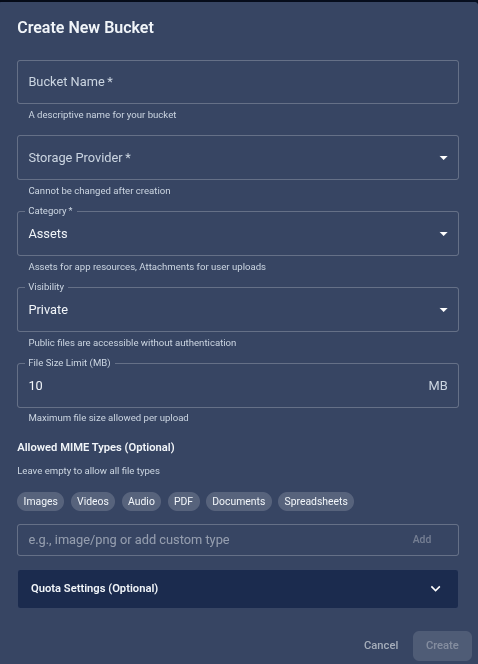
app_category is required. An attachments bucket lets signed-in users read,
upload, and update files, which is enough for this tutorial.
Either way, the bucket gets a slug derived from its name — here
quickstart-scratch. The API response includes it. Save it for the next steps:
export BUCKET_SLUG="quickstart-scratch"
The SDK and Refine examples below use quickstart-scratch. Substitute the
slug returned for your bucket if it differs.
Checkpoint: GET .../storage/buckets/${BUCKET_SLUG}/ returns 200 with
"visibility": "private" and "storage_provider": "s3". Python can read the same
details with client.storage.get_bucket("quickstart-scratch").
Step 2: Upload a file#
Use a small text file named hello.txt.
- JavaScript SDK
- Python SDK
- Refine
- REST API
import {Storage} from '@taruvi/sdk';
import type {StorageUploadBatchResponse} from '@taruvi/sdk';

await new Storage(client).from('quickstart-scratch').upload({
  files: [file], paths: ['hello.txt'], metadatas: [{purpose: 'quickstart'}],
}).execute<StorageUploadBatchResponse>();
file is your text file as a browser File. Check the response’s
data.failed list for per-file errors.
client.storage.from_("quickstart-scratch").upload(
    files=[("hello.txt", file, "text/plain")],
    paths=["hello.txt"], metadatas=[{"purpose": "quickstart"}],
)
file is an open binary stream for hello.txt. Check the returned
failed list for per-file errors.
import {useCreate} from '@refinedev/core';

const {mutate: upload} = useCreate();

// Call from an event handler.
upload({
  dataProviderName: 'storage',
  resource: 'quickstart-scratch',
  values: {
    files: [file],
    paths: ['hello.txt'],
    metadatas: [{purpose: 'quickstart'}],
  },
});
file is your text file as a browser File. The onSuccess callback
receives the uploaded object in data, or per-file errors in data.failed;
check for those errors before continuing.
/api/apps/$TARUVI_APP_SLUG/storage/buckets/$BUCKET_SLUG/objects/hello.txt/Before you run
echo "Hello, TaruviBase Storage." > hello.txt
Headers
AuthorizationApi-Key $TARUVI_API_KEY
Multipart form
fileFile: hello.txtmetadata- {"purpose": "quickstart"}
View cURL
echo "Hello, TaruviBase Storage." > hello.txt
curl --silent --show-error -X PUT "$TARUVI_SITE_URL/api/apps/$TARUVI_APP_SLUG/storage/buckets/$BUCKET_SLUG/objects/hello.txt/" \
-H "Authorization: Api-Key $TARUVI_API_KEY" \
--form-string 'metadata={"purpose":"quickstart"}'
201201 when a new object is created; 200 when an existing object is replaced.
The supplied path (hello.txt) becomes the file's path in the bucket.
Checkpoint: REST returns 201 Created for a new file. SDK uploads use the
batch endpoint, which returns 200 or 207; confirm the failed list is
empty. The stored object's details include file_path (hello.txt), size,
mimetype (text/plain), and your metadata.
Step 3: Download the file#
- JavaScript SDK
- Python SDK
- Refine
- REST API
import {Storage} from '@taruvi/sdk';

await new Storage(client).from('quickstart-scratch')
  .download('hello.txt').execute<Blob>();
The method returns a Blob. Compare its bytes with the file you uploaded.
client.storage.from_("quickstart-scratch").download("hello.txt")
The method returns bytes. Compare them with the file you uploaded.
import {useOne} from '@refinedev/core';

useOne<Blob>({
  dataProviderName: 'storage',
  resource: 'quickstart-scratch',
  id: 'hello.txt',
});
id is the object path. After the request succeeds, the hook’s result
contains the downloaded Blob; compare its bytes with the file you uploaded.
/api/apps/$TARUVI_APP_SLUG/storage/buckets/$BUCKET_SLUG/objects/hello.txt/Headers
AuthorizationApi-Key $TARUVI_API_KEY
Save response
Filehello.out.txt
View cURL
curl --silent --show-error "$TARUVI_SITE_URL/api/apps/$TARUVI_APP_SLUG/storage/buckets/$BUCKET_SLUG/objects/hello.txt/" \
  -H "Authorization: Api-Key $TARUVI_API_KEY" \
  --output 'hello.out.txt'
200
diff hello.txt hello.out.txt && echo "OK: bytes match"
To read only the file's details, add ?metadata=true:
- JavaScript SDK
- Refine
- REST API
import {Storage} from '@taruvi/sdk';
import type {StorageResponse} from '@taruvi/sdk';

await new Storage(client).from('quickstart-scratch')
  .metadata('hello.txt').execute<StorageResponse>();
The response’s data.metadata contains the saved metadata.
import {useOne} from '@refinedev/core';
import type {StorageObject} from '@taruvi/sdk';

useOne<StorageObject>({
  dataProviderName: 'storage',
  resource: 'quickstart-scratch',
  id: 'hello.txt',
  meta: {metadata: true},
});
The hook’s result.metadata contains the saved metadata after the request
succeeds.
/api/apps/$TARUVI_APP_SLUG/storage/buckets/$BUCKET_SLUG/objects/hello.txt/Headers
AuthorizationApi-Key $TARUVI_API_KEY
Query parameters
metadatatrue
View cURL
curl --silent --show-error -G "$TARUVI_SITE_URL/api/apps/$TARUVI_APP_SLUG/storage/buckets/$BUCKET_SLUG/objects/hello.txt/" \
  -H "Authorization: Api-Key $TARUVI_API_KEY" \
  --data-urlencode 'metadata=true'
200
Checkpoint: the downloaded bytes match, and the details include
"purpose": "quickstart" and "visibility": "private" (a file's visibility
always follows its bucket).
Step 4: Clean up#
Deleting a bucket is permanent. This tutorial bucket should contain only
hello.txt.
Delete the bucket, which also deletes hello.txt:
- Python SDK
- REST API
client.storage.delete_bucket("quickstart-scratch")
/api/apps/$TARUVI_APP_SLUG/storage/buckets/$BUCKET_SLUG/Headers
AuthorizationApi-Key $TARUVI_API_KEY
View cURL
curl --silent --show-error -X DELETE "$TARUVI_SITE_URL/api/apps/$TARUVI_APP_SLUG/storage/buckets/$BUCKET_SLUG/" \
  -H "Authorization: Api-Key $TARUVI_API_KEY"
200Returns success after deletion; this operation is irreversible.
Deleting a single file instead requires a policy rule that allows delete, which no default bucket policy includes. See Security and limits.
Checkpoint: GET .../storage/buckets/${BUCKET_SLUG}/ now returns 404.
If you followed the REST path, remove the two local test files:
rm hello.txt hello.out.txt
What's next#
- How storage works — buckets, paths, and visibility
- Work with objects — uploads from the SDKs, metadata, and deletes
- Security and limits — review before production